How much RAM do you need for gaming in 2026 is the kind of question that sounds simple until you are staring at a 16GB and a 32GB kit in the same browser tab, both at a similar price. I have rebuilt this exact decision more than once on my own bench, and the honest answer depends less on the game and more on what else is running while you play.
📋 Table of Contents
TL;DR: For most single-game sessions, 16GB still gets the job done. The moment you add Discord, a browser with a pile of tabs, or recording software, 32GB stops being a luxury and starts protecting your 1% lows. If you are buying new in 2026, 32GB is the safer default. If you already own 16GB and only game, you are probably fine for now.
Quick wins if you are in a hurry
- Open Task Manager during a session and check your memory usage under load, not at idle.
- Close Discord and background browser tabs before you decide you need more RAM.
- If you are buying today, go for a 2x16GB dual-channel kit over a single 32GB stick.
- Check your motherboard’s supported speed before buying faster RAM than it can run.
Got 10 more minutes? Keep reading for the full breakdown.

Grab Your 6★ Weapon Before It's Gone!
- Free-to-play strategy
- Optimized for Windows PC

Start With 10,000+ Oroberyls , Hit Play!
- Arknights: Endfield — Free on PC. 10,000
- Oroberyls up for grabs.

Your Squad's Waiting. Jump In Free!
- New Homecoming Expansion: 2 Maps, 2 Operators, 1 Free 6★ Weapon: $0.
- Action RPG - Base Building on PC-Play Free, Keep Your Progress on Mobile.
This assumes your GPU drivers are current and Windows is up to date. If you have not checked that yet, start with our guide to choosing PC parts for gaming before you spend money on memory.
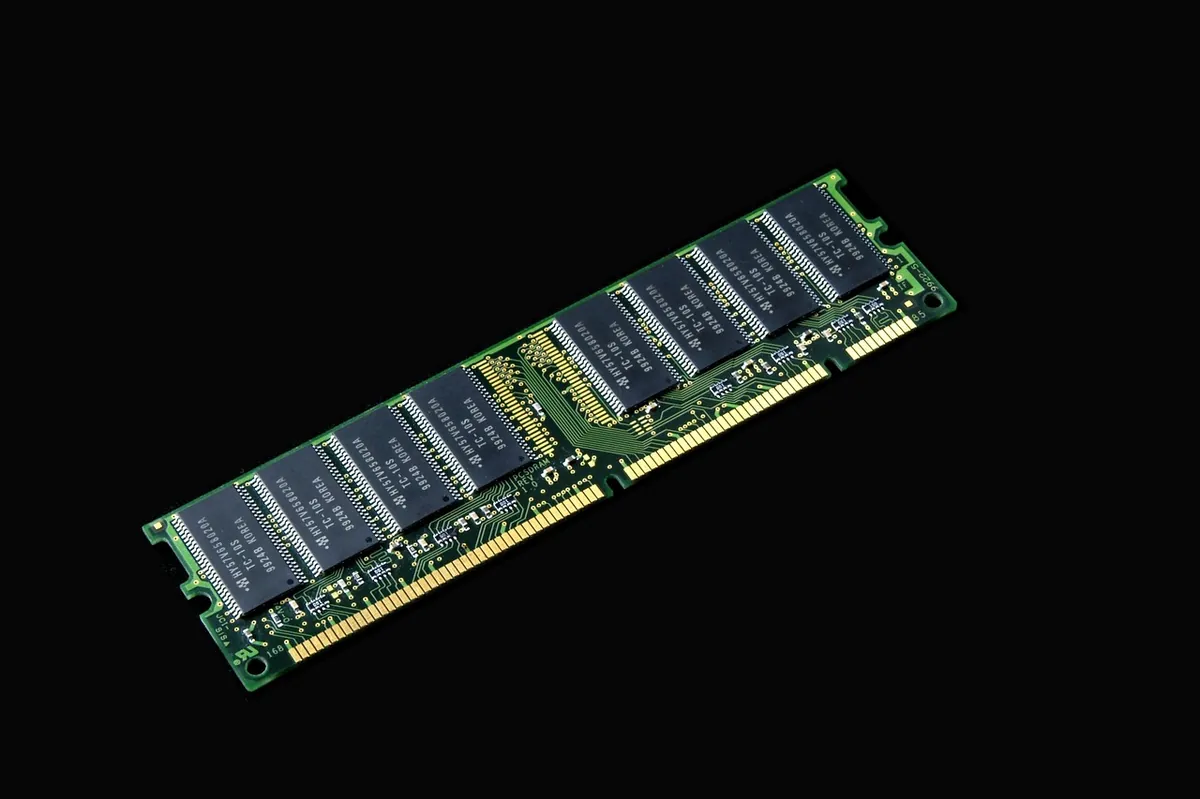
How much RAM do you need for gaming: the short answer
Pure average FPS rarely moves much between 16GB and 32GB. In one round of 2026 testing on Call of Duty: Black Ops 7 Zombies, 16GB averaged 149 FPS and 32GB pushed that to 156 FPS, a gap under 5 percent. That tracks with PC Gamer’s own 2026 testing on this exact tradeoff, and with GamersNexus’ RAM frequency benchmarks, which both point to dual-channel and speed mattering more for 1% lows than raw capacity alone. That is not the number that matters most.
What actually changes is consistency. The 1% and 0.1% lows, the brief stutters you feel when your system has to swap data between RAM and storage, get noticeably worse on 16GB once you load the system with background apps. I have felt this exact stutter mid fight in a multiplayer match, and it almost always traces back to memory pressure, not the GPU.
What actually uses your RAM while gaming
Background apps
Discord, a browser, and an overlay tool can sit at 2 to 4GB combined before the game even loads. None of that is wasted, it is just competing for the same pool.
Browser and Discord specifically
A modern browser with a dozen tabs open is one of the heaviest background processes on a gaming PC. Pair that with Discord voice and a streaming overlay, and systems with 16GB regularly sit at 14 to 15GB used before you account for the game itself.
The game
Modern titles built on engines like Unreal Engine 5 lean on system RAM for texture and geometry streaming through features like Nanite and Lumen. That is a big part of why 16GB feels tighter in 2026 than it did three years ago.
When 16GB is genuinely enough
If you play one game at a time, close background apps, and mostly stick to esports titles like Valorant or CS2, 16GB still holds up fine in my experience. These games are tuned to run on modest hardware, and the memory footprint stays light.
When you need 32GB
Streaming and gaming at the same time
Add OBS or a similar capture tool to the mix and 16GB gets uncomfortable fast. I would not run a stream on 16GB without watching memory usage closely.
Modded games
Mod-heavy setups, especially texture replacers, can multiply a game’s memory footprint several times over. 32GB gives you room without micromanaging what is open.
General multitasking
If your normal routine includes a dozen browser tabs, Discord, Spotify, and the game all running together, 32GB removes a variable you would otherwise have to think about.
| Setup | Recommended RAM | Why |
|---|---|---|
| Single game, no background apps | 16GB | Light footprint, esports titles especially |
| Game plus Discord and browser | 32GB | Avoids swap stutters under normal multitasking |
| Streaming, recording, or modding | 32GB or more | Capture software and mods add a second heavy consumer |
RAM speed and dual-channel: does it matter for FPS
This is the part most people skip, and it is arguably more important than the 16 versus 32GB question. Running RAM in dual-channel instead of single-channel, meaning two matched sticks instead of one, has shown gains of 10 to 25 percent in CPU-bound games in independent testing. One CS2 test on a Ryzen 5 5600X went from 187 FPS in single-channel to 234 FPS in dual-channel, just from filling the second slot.
I check this first whenever someone tells me their new build feels slower than it should. A single stick of RAM in a dual-channel motherboard is one of the most common, and easiest to fix, performance mistakes I run into.
RAM speed itself matters more in CPU-heavy games than GPU-heavy ones. If your card is the bottleneck at high resolution, a faster RAM kit will not move the needle much. If you are CPU-bound in a competitive shooter, it can.
Common issues and fixes
Issue: Stuttering that feels random, not tied to any specific graphics setting.
Fix: Check memory usage in Task Manager during the stutter. If it is near full, the fix is more RAM or fewer background apps, not a GPU setting.
Issue: New build performs worse than expected despite a strong CPU and GPU.
Fix: Confirm both RAM sticks are installed in the correct dual-channel slots from your motherboard manual.
Issue: RAM is installed but running below its rated speed.
Fix: Enable XMP or EXPO in your BIOS. Most boards ship with memory running at a slower default speed until you turn this on.
Issue: Memory usage climbs steadily the longer a session runs.
Fix: This points to a memory leak in a background app or the game itself rather than a hardware shortage. Restarting the affected app usually confirms it.
Frequently asked questions
Is 16GB enough for gaming in 2026?
For single-game sessions on esports titles like Valorant or CS2, yes. Once you add streaming, mods, or heavy multitasking, 32GB is the safer choice.
Does RAM speed matter more than capacity?
For CPU-bound games, dual-channel and speed can matter more than going from 16GB to 32GB. Capacity protects you from stutter; speed and dual-channel protect your average FPS.
Should I buy a single 32GB stick or two 16GB sticks?
Two matched sticks running in dual-channel, not one large stick. Single-channel setups lose a meaningful chunk of CPU-bound performance.
Quick checklist before you upgrade
- Check real memory usage under load, not at idle
- Confirm dual-channel is actually enabled with both sticks installed correctly
- Enable XMP or EXPO if your RAM is running below its rated speed
- Decide based on what you run alongside the game, not the game alone
- Match RAM speed to what your motherboard and CPU actually support
Get the dual-channel setup right and the RAM amount question becomes much smaller than people expect. If storage speed is the next thing on your list, our guide on whether SSD speed affects FPS covers the other half of the system that gets blamed for stutter it did not cause.
Written by Anir | FPSFlow.com
Focus: PC performance optimization and FPS troubleshooting
Last updated: June 2026
Method: Based on hands-on testing, aggregated player reports, and published 2026 benchmark data from PC Gamer and GamersNexus