How to choose a power supply for your gaming PC is one of those questions people skip until something goes wrong. I learned this the hard way years ago when a budget PSU shut down mid game during a GPU upgrade. The card was fine. The power supply was not built for it.
📋 Table of Contents
TL;DR: Match your PSU wattage to your GPU, leave headroom for transient spikes, and pick at least an 80 Plus Bronze unit from a known brand. For most builds running a single mid-range or high-end GPU, 750 to 850W on an ATX 3.x unit covers you comfortably.
Quick wins if you are in a hurry
- Check your GPU manufacturer’s recommended PSU wattage, then add some headroom.
- Buy at least 80 Plus Bronze. Anything lower is not worth the risk.
- If you run an RTX 50 series or RX 9000 series GPU, get an ATX 3.x certified unit.
- Never buy the cheapest unlabeled PSU you can find. This is the one part not worth cutting cost on.
Got 10 more minutes? Keep reading for the full breakdown.

Grab Your 6★ Weapon Before It's Gone!
- Free-to-play strategy
- Optimized for Windows PC

Start With 10,000+ Oroberyls , Hit Play!
- Arknights: Endfield — Free on PC. 10,000
- Oroberyls up for grabs.

Your Squad's Waiting. Jump In Free!
- New Homecoming Expansion: 2 Maps, 2 Operators, 1 Free 6★ Weapon: $0.
- Action RPG - Base Building on PC-Play Free, Keep Your Progress on Mobile.
This assumes you already know roughly which CPU and GPU you are pairing it with. If you have not settled on parts yet, our guide to choosing PC parts for gaming is the better starting point.
How to choose a power supply for your gaming PC by wattage
Wattage requirements track your GPU more than anything else in the build. An RTX 5070 draws around 250W on its own, and Nvidia lists a 750W recommendation for the full system, a figure echoed by Tom’s Hardware’s own PSU sizing guide for the RTX 50 series. Step up to an RTX 5080 at roughly 360W, and the official recommendation moves to 850W, with 1000W giving you comfortable headroom if you are pairing it with a power-hungry CPU.
| GPU tier | Typical GPU draw | Recommended PSU |
|---|---|---|
| Entry (RTX 5060 class) | ~150W | 550 to 650W |
| Mid-range (RTX 5070 class) | ~250W | 650 to 750W |
| High-end (RTX 5080 class) | ~360W | 850 to 1000W |
| Enthusiast (RTX 5090 class) | 450W+ | 1000W or more |
I always size a build a notch above the bare minimum. It is not about running close to your PSU’s limit every day, it is about the spikes that happen for a fraction of a second under heavy load.
What 80 Plus Bronze, Gold, and Platinum actually mean
The 80 PLUS rating tells you how efficiently a PSU converts wall power into the power your components actually use, measured at 50 percent load. Bronze sits at 85 percent efficiency, Gold at 90 percent, and Platinum at 92 percent, with Titanium topping out around 94 percent.
The difference between tiers matters less for your FPS and more for your power bill and heat output. A Gold unit running cooler and quieter under sustained load is a real benefit if your case airflow is already tight, but Bronze from a reputable brand is not a downgrade you need to panic about.
Modular or not, does it matter
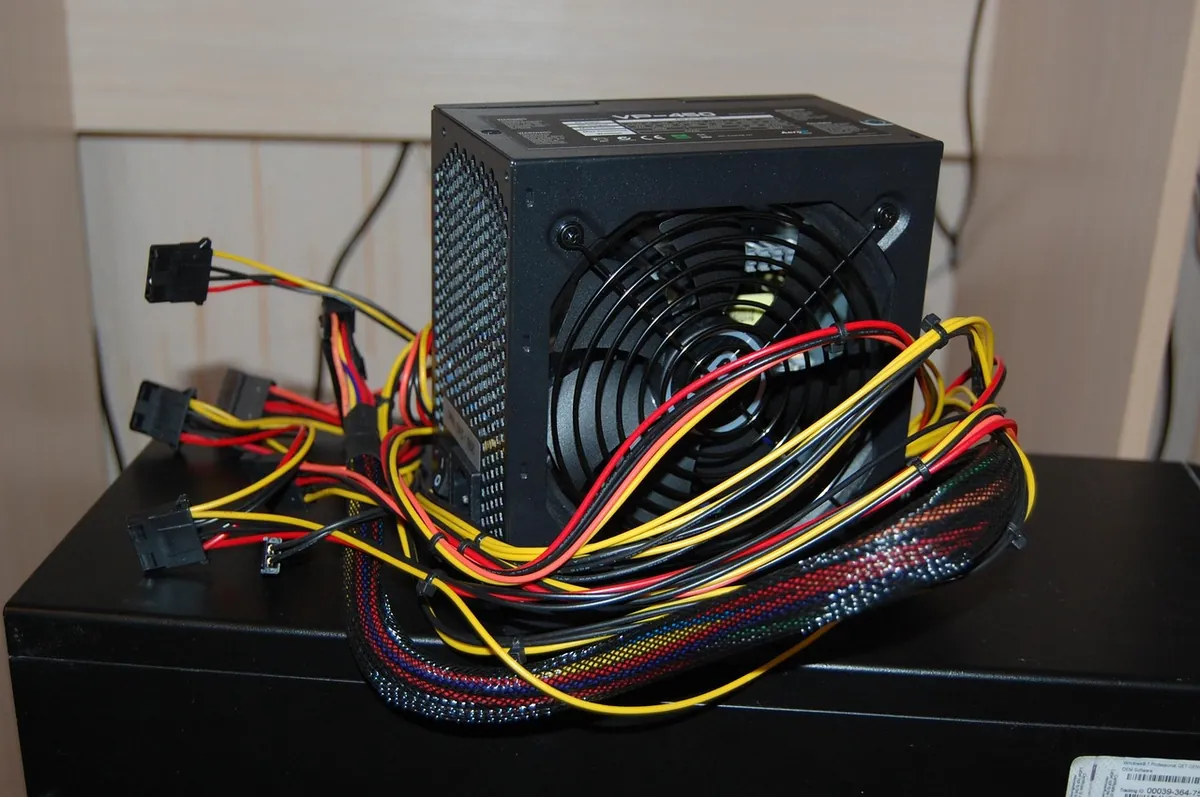
Modular cables let you skip plugging in connectors you do not need, which helps airflow and cable management. It does not change performance or stability at all. I would not pay a large premium for full modularity on a budget build, but I would not skip it either if the price gap is small.
PCIe power connectors and transient spikes
Average wattage is not the full picture. High-end GPUs draw short power spikes well above their rated TDP, sometimes for only a few milliseconds. An RTX 5080 rated at 360W can spike toward 450 to 500W during these moments. A PSU that is not built to absorb that will trip its protection circuit and shut the whole system down, even though the average load was nowhere near its limit.
This is exactly why ATX 3.x certification matters on newer builds. ATX 3.x units are designed and tested specifically for these spikes, and most of them ship with the native 12V-2×6 connector that current Nvidia cards expect instead of relying on an adapter. If you are buying a PSU for an RTX 50 series card, treat ATX 3.x as a requirement rather than a nice-to-have.
Count your connectors before you buy, not after. Check how many PCIe power connectors your GPU needs, whether it uses the newer 12V-2×6 standard, and whether your CPU needs one or two CPU power connectors. Running an adapter chain because you are one cable short is not where you want to be mid build.
Efficiency sweet spot and sizing
PSUs run most efficiently somewhere between 40 and 80 percent of their rated load, not at the extremes. An 850W unit powering a system that draws 500W under load sits at roughly 59 percent, which is close to ideal. Oversizing by a huge margin does not hurt performance, but it does mean you are paying for headroom you rarely use. Undersizing is the real risk, since it pushes the PSU toward its limit during exactly the moments your GPU spikes hardest.
Signs your power supply is holding you back
Random shutdowns under load
If your PC powers off during intense scenes or right after a GPU upgrade, that is the classic sign of a PSU that cannot handle a transient spike. This is exactly what happened on my own bench years ago.
Will not boot under a new, more demanding GPU
A system that boots fine at idle but fails the moment the GPU ramps up under a real game is almost always a power delivery problem, not a driver issue.
Common issues and fixes
Issue: System shuts down or reboots during intense gaming moments.
Fix: Check your PSU wattage against your GPU’s recommended spec. If you are close to the limit, upgrade before troubleshooting anything else.
Issue: New high-end GPU installed, PC will not boot.
Fix: Confirm your PSU has the correct number of PCIe power connectors and enough headroom for transient spikes, not just average draw.
Issue: PSU fan is loud under load.
Fix: This often means the unit is running near its limit. A higher wattage unit of the same efficiency tier usually runs quieter since it operates at a lower percentage of its capacity.
Frequently asked questions
What wattage PSU do I need for an RTX 5070?
Around 650 to 750W covers it comfortably with headroom for transient spikes.
Is 80 Plus Gold worth the extra cost over Bronze?
It runs cooler and quieter under sustained load, but it will not change your FPS. Bronze from a reputable brand is a safe choice on a budget build.
Do I need an ATX 3.x PSU?
Yes, if you are running an RTX 50 series or RX 9000 series GPU. ATX 3.x units are built and tested for the transient power spikes these cards produce.
Quick checklist before you buy
- Check your GPU’s official recommended PSU wattage
- Add headroom rather than buying to the exact minimum
- Choose at least 80 Plus Bronze from an established brand
- Get an ATX 3.x certified unit if you run an RTX 50 series or RX 9000 series GPU
- Count your required PCIe and CPU power connectors before you buy
Once your power delivery is sorted, the next most common bottleneck people misdiagnose is the CPU or GPU itself. Our guide on telling a GPU bottleneck from a CPU bottleneck walks through the five minute check I run on every build.
Written by Tema | FPSFlow.com
Focus: PC performance optimization and FPS troubleshooting
Last updated: June 2026
Method: Based on hands-on build experience and official GPU manufacturer power specifications